Understanding Authentication, Authorization, and Encryption
Authentication
- Authentication is an absolutely essential element of a typical security model. It is the process of confirming the identification of a user (or in some cases, a machine) that is trying to log on or access resources. There are a number of different authentication mechanisms, but all serve this same purpose.
- Authentication is used by a server when the server needs to know exactly who is accessing their information or site. Used by a client when the client needs to know that the server is system it claims to be.
It is very easy to confuse between Authentication and Authorization. Authorization is yet another mechanism when security considered. Where Authentication verifies the user’s identity and Authorization verifies whether user has permissions to access resources. We will discuss Authorization in next segment.
Authentication can be verified with the help of few ways which are listed below:
1. Password:
a. Most widely used form of Authentication
b. Password authentication does not require complicated or robust hardware since authentication of this type is simple and does not require much processing power.
2. One-time Password: ( OTP )
a. OTP is a password that is valid for only one login session or transaction.
b. OTP provide another layer of security to normal password login authentication.
3. Public Key Cryptography:
a. Public key cryptography is based on very complex mathematical problems that require very specialized knowledge.
b. Public key cryptography make use of two keys public key and private key. These two keys are linked together by way of an extremely complex mathematical equation.
4. Certificate Pinning:
a. This technique is used to authenticate server while communicating over network.
b. This is used to avoid man in middle attack over network. It uses server certificates validation at client side for verification
For more detailed explanation, read my blog on “Certificate Pining”
Authorization
Authorization is a mechanism by which system determines what level of access a particular authenticated user should have to secure resources controlled by the system.
Authorization can be done with the help of few techniques which are listed below:
1. OAuth
2. Permissions :
a. Files read write access
b. Providing permissions to access any database.
3. Defining Roles to access secured resources.
Encryption
- Encryption involves the transformation of the data so that it is unreadable by anyone who does not have decryption key.
- By encrypting the data exchanged between the client and server information like Passwords, PIN, credit card numbers, sensitive data etc. can be sent over the Internet with less risk of being intercepted during transit.
- Types:
o Symmetric Key Encryption
o Asymmetric Key Encryption (Public key encryption)
1. Symmetric Key Encryption (Private key encryption)
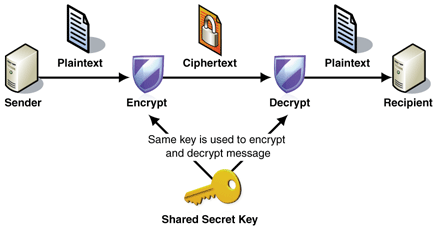
a. As the name suggest, Encryption and decryption operation utilizes same key.
b. Communicating parties must have the same key shared before they can achieve secure communication.
c. Symmetric encryption is typically more efficient than Asymmetric encryption.
d. The problem with secret keys is exchanging them over the Internet or a large network while preventing them from falling into the wrong hands. Anyone who knows the secret key can decrypt the message. Solution to this is Asymmetric key encryption.
There are various symmetric key algorithms such as
- DES, TRIPLE DES, AES, RC4, RC6, BLOWFISH.
2. Asymmetric Key Encryption (Public key encryption)
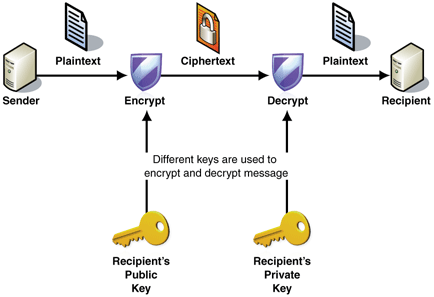
a. This type of encryption involves two keys in encryption and decryption process. i.e. Public key and Private Key.
b. Public key is made freely available to everyone who wants to send secrete message to you whereas Private key is kept secret, so that only you know it.
c. In this encryption, message encrypted using public key can only be decrypted using respective private key only. That means you actually don’t have to worry while passing your public key to everyone in the world.
d. It is slower than Symmetric key encryption, because it takes more processing power.
There are few Asymmetric Key Encryption Techiniques:
- Digital Signature Standard
- RSA
-
- Digital Signature Standard
- RSA
-
Don’t worry if you have any doubts about encryption, There is a blog coming very soon with detailed explanation on Encryption.
Do let me know if you are unclear with anything explained above.
Comments
Post a Comment